Horizon allows you to view the campaign delivery statistics. When looking at your campaign stats, you may find that not all contacts were sent the message.
How to find out why contacts weren’t sent your campaign message
- Click | Campaigns |
- You can view the message delivery statistics via two routes
Via the campaign:
Edit the relevant campaign
Go to the ‘message delivery’ section and click the view icon
Via the ‘Message status’ section:
In Campaigns, click ‘Archived messages’ from the left-hand menu
Find your campaign. This will have the campaign name followed by ‘BC1’
Click the view icon to the right of the green progress bar
If you can’t find your campaign under ‘Archived messages’, this means your campaign is still running and can be found in ‘Active messages’ - In the message delivery status screen, go to ‘Message delivery progress’
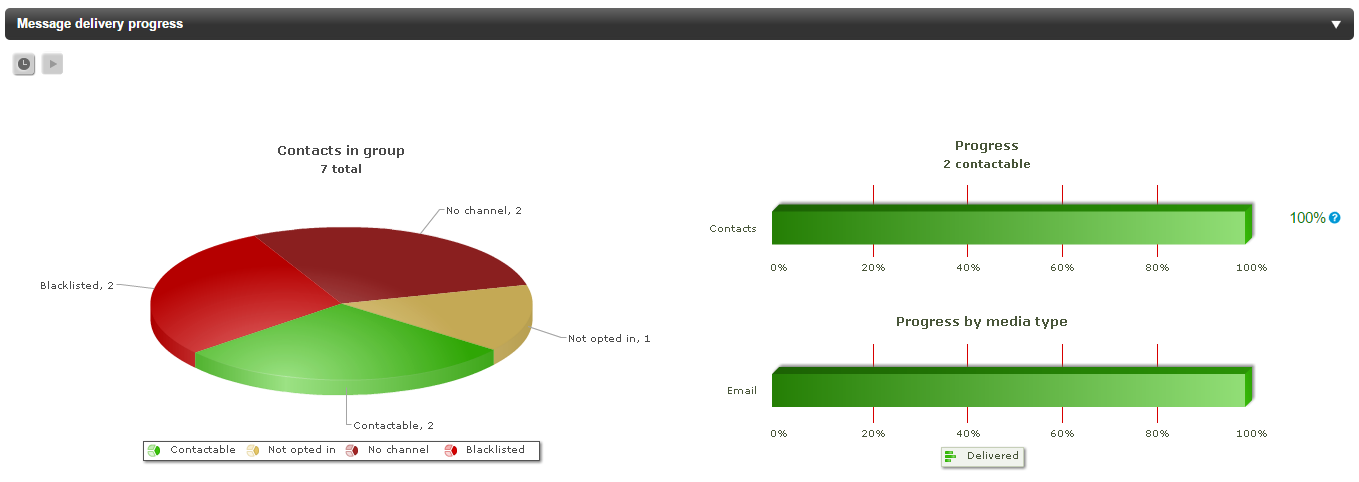
The sections in green represents how many contacts were successfully sent the message
The sections in red represents how many contacts didn’t receive the message
The sections in yellow represents contacts that weren’t sent the message as they weren’t opted in
‘Contactable’ means there is no issue sending to this contact and the message was successfully sent.
‘No channel’ means they didn’t have the relevant channel needed for the campaign. For example, the contact didn’t have an email in their contact record when sent an email campaign.
‘Blacklisted’ means that email address is not reachable. This can be due to a variety of reasons, although it's commonly due to the email being invalid. Once a contact is blacklisted, you will no longer be able to send them emails. Sending to invalid email addresses can be damaging to your sender reputation. This means it's more likely the messages will go to a contacts spam folder, or be banned from sending to a email provider altogether.
‘Not opted in’ means your contact wasn’t opted in for your messages. If the contacts opt-in preferences don’t match the opt-in setup up in the message, they won’t be sent the message. If you are seeing ‘Not opted in’ in your campaign stats, you should look at your groups and ensure you are only sending to opted in contacts. Consider using a rule group and adding the opt-in category rule. For more information of rule groups, see Rule groups: Automatic groups using contact data