By linking your Horizon emails and web landing pages, you can create seamless end-to-end customer experiences that convert subscribers into sales prospects, capture personalised survey responses and more.
Vanity URLs
When you create a campaign that includes a web landing page (called a "publication" in Horizon), you need to specify a Vanity URL. This is the web address on which all the landing pages for the campaign will be published.
The Vanity URL will look something like this:
- https://myCompany.htkhorizon.com/YourVanityURL
You can then create a link from your email message to this landing page, so that your subscribers can click through from the message and complete some kind of action.
Rather than creating a "page link" in your email message (as you would for linking to other webpages), you should use a Horizon "publication link". This has a few benefits:
- The link will still work if you decide to change the vanity URL.
- You can clone existing campaigns and any publication links will work fine in the new copy.
- Links are more trackable, enabling personalisation of the landing page for each contact.
To link a landing page to your email message
1. Create your email message, adding one or more "call-to-actions" (text and/or images) where you would like your subscribers to click through to your web landing page. See Creating an email message.
2. Select each call-to-action and turn it into a publication link. For more information about publication links, see Adding links to an email message.
3. If you'd like to link to a landing page that's already active in another campaign, select that campaign's name when creating your publication link:
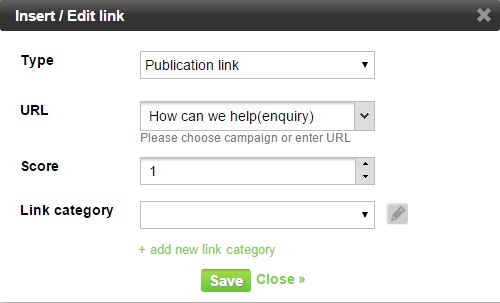
3. If you're planning to add your email message and web landing page to the same campaign, select "The campaign vanity URL":

Note: At this stage you don't need to know what the vanity URL actually is, Horizon will work that out once you've added your message to a campaign.
4. Save your message.
5. Before you run the campaign, make sure you have created and added the web landing page and set up the vanity URL in the campaign. For more information on campaigns, see Creating a new campaign.